Overview
- Business Owner adds Milestone as a “Partner” to their Facebook Business Manager Account
- Business owner Adds Milestone as a “Partner” to the Company Brand Page via Business Manager
- Milestone Accepts Partner & Page request.
Follow these steps to add Milestone as a partner to your Facebook Business Account.
Step 1: Log into Business Manager Via: https://business.facebook.com/
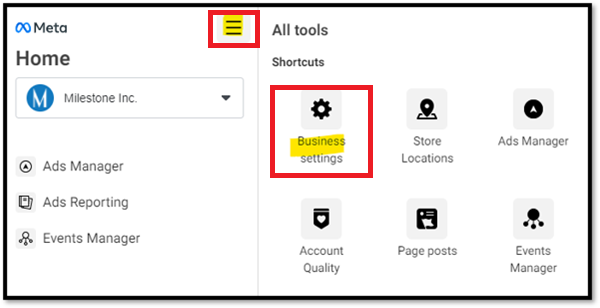
Select the menu drop-down from the top left navigation and click ‘Business Settings'.
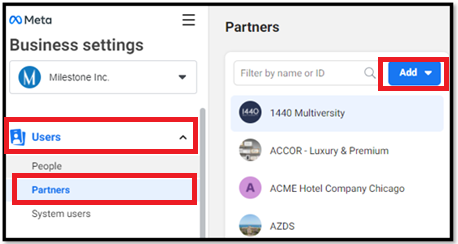
Step 2: Under ‘Users’ click on ‘Partners’ in the left-hand menu and then click the Blue ‘Add’ button
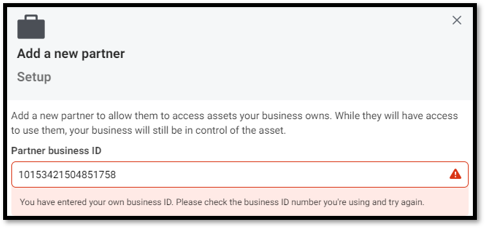
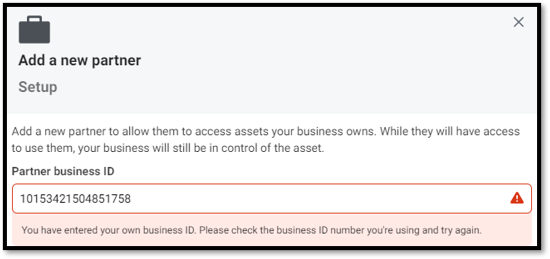
Step 3: Select ‘Give a partner access to your assets and enter the Milestone Agency ID: 10153421504851758
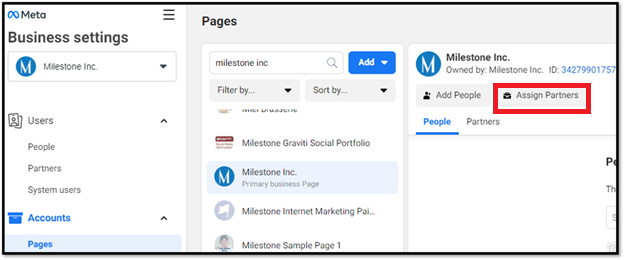
Step 4: Click on ‘Assign Partners’
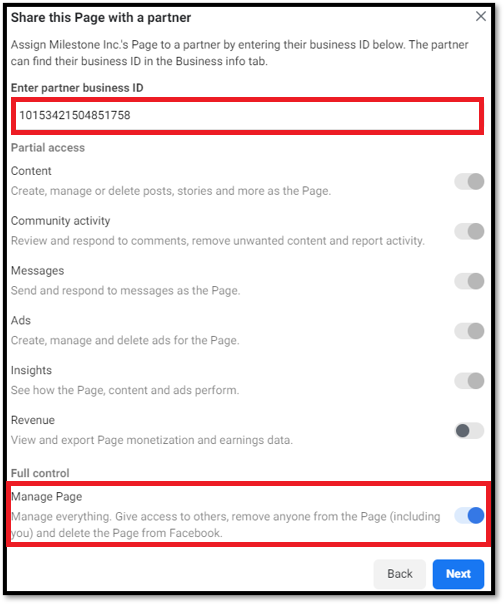
Step 5: Enter the milestone Agency ID: 10153421504851758
Step 6: Choose the ‘Manage Page’ Access setting at the bottom of pop up
You have now added Milestone to your Facebook Listing!
Was this article helpful?
That’s Great!
Thank you for your feedback
Sorry! We couldn't be helpful
Thank you for your feedback
Feedback sent
We appreciate your effort and will try to fix the article