To view more than 5 widgets, click on the  button. The widgets drop-down
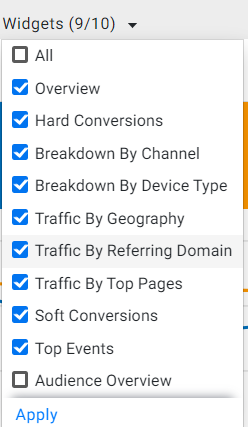
  will then appear. Click on the drop-down and then choose the widgets you wish to be displayed on the screen. Click on ’Apply’ once you have selected the widgets.
Was this article helpful?
That’s Great!
Thank you for your feedback
Sorry! We couldn't be helpful
Thank you for your feedback
Feedback sent
We appreciate your effort and will try to fix the article