Overview
When implementing structured data (schema markup) on your website, it's crucial to ensure that all required fields are populated with valid information. Leaving mandatory fields empty can lead to errors during validation, potentially affecting how search engines interpret and display your content.
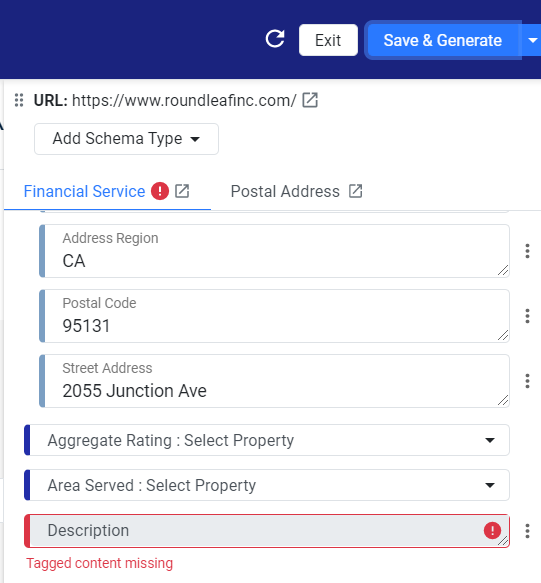
If the website content changes or there is a change to the structure of the page, the underlying paths to the tagged property value may change, resulting in those values no longer being available on the original paths. Within the Schema editor, such tagged values appear empty. The Schema Editor will now flag an error for such empty tagged values, mandating you to enter the tagged field to ensure that the page continues to have all the required schema values upon publishing. Let’s show you an example.
Since the page structure changed, when clicking on ‘Save & Generate’, an error is automatically flagged for the user to tag the missing content.
Common Scenario
Issue: A required field in your schema markup is left empty.
Consequence: Search engines encounter errors when parsing your structured data, potentially ignoring the markup or displaying warnings in search console tools.
Was this article helpful?
That’s Great!
Thank you for your feedback
Sorry! We couldn't be helpful
Thank you for your feedback
Feedback sent
We appreciate your effort and will try to fix the article