

Knowledge base
Release November 5, 2026
AI search no longer ranks pages; it assembles answers from the sources it trusts. This release helps businesses act on that shift with fewer blind spots and less dependency. It brings verified citation links to GEO Intelligence and self-serve event content in Event Calendar and crucial Page Studio releases.
1. Know which AI citations actually work
The Problem: GEO Intelligence shows the sources that AI engines such as ChatGPT, Gemini and Perplexity cite in their answers. Some of those links are broken, and the only way to find them was to open each URL by hand. A cited page that no longer loads is a dead end for anyone who follows it.
The Solution: Every citation link is now checked automatically before you click it.
What's New:
- Each citation source in Prompts, Citations and Accuracy shows its status at a glance. Hover over the indicator to see whether the link opens.

- Links that fail are flagged with the reason, such as "404 – Page not found".
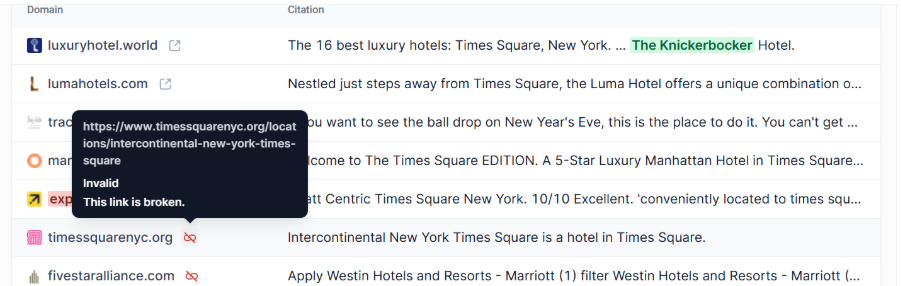
- Teams can spot cited pages on their own site that are broken and fix them, for example by setting up a redirect.
Why It Matters: AI engines are already sending people to these URLs. Verified links give teams a trustworthy baseline of what AI cites and turn broken citations into a clear, prioritized fix list.
2. Keep event content precise and self-serve
The Problem: Teams could not update event details on their own. Every change to pricing or a booking button depended on internal teams, with a turnaround of 1–2 days. Pricing could only be shown as a low-to-high range, so a page could not say “$22 per person” or “Free for hotel guests”. Every booking button used the same fixed label, whatever the event.
This also cost AI visibility. AI engines reward content that adds something new: specific, answerable facts a model cannot find elsewhere. A price range and a generic button give them nothing to cite.
The Solution: Two new self-serve fields that let teams publish exact pricing and event-specific calls to action, plus corrected category mapping for nearby events.
What's New:
- Custom price text: choose a price range or free-text pricing, such as "$22 per person" or "Kids under 12 free". Exact prices answer the cost question directly, for the guest and for any AI engine summarizing the event.
- Booking button label: set button text per event, such as "Book Tickets", "Reserve a Table" or "Register Free". Leave it blank to keep the default. A label that names the next step tells the guest exactly what happens on click.
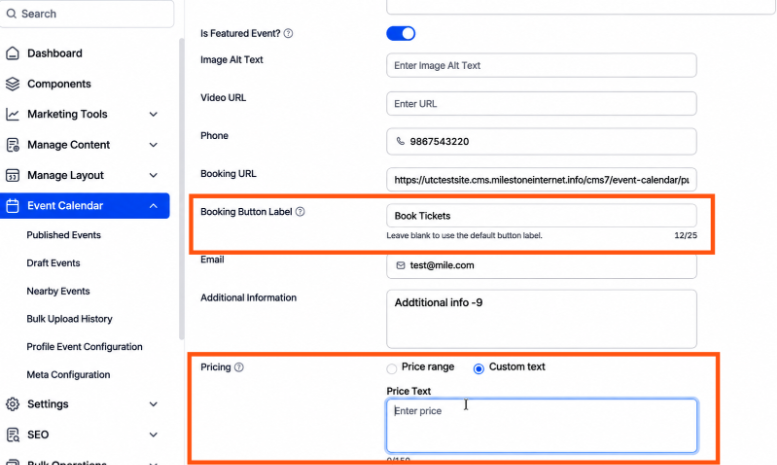
Fix: Accurate nearby-event categories: PredictHQ events now map to the correct category filters.
Why It Matters: Exact pricing and fresh event details are additive content: concrete facts that give AI engines a reason to cite your page over a generic listing. They also remove the last open question before a guest commits. A specific call to action then turns that interest into a decision, for a person on the page or an AI agent completing a booking. Teams publish these changes in minutes instead of a day, so event pages stay current as plans change.
3. Manage and access complex, nested content/records in a fewer clicks
The Problem: MiBlock components often nest several levels deep, such as a Meeting Space with Floor Plans, Capacity Charts and a Gallery, or a Menu with Sections and Items. Reaching one record meant opening the parent, opening its sub-records, finding the item, then clicking edit. After each save, editors had to drill down again, and it was easy to lose track of where a record sat in the hierarchy.
The Solution: A redesigned Record Manager with a navigation tree and in-place editing, so editors can reach and update any record from one screen.
What's New:
- Navigation tree: the full component hierarchy sits in the left panel. Expand any level and click a record to open it, with a count of the records each item holds.
- In-place editing: a record opens beside the tree. Click Save to stay put and move to the next record or Save & Close to return to the list.
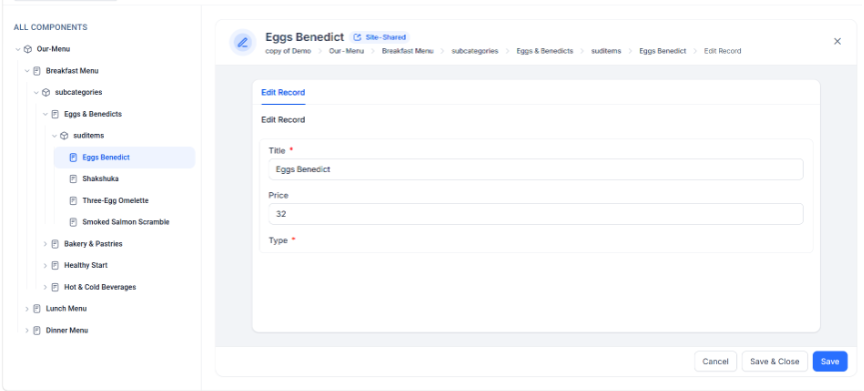
- Breadcrumbs: jump back to any level from above the record title.
- Faster list management: search, filter, sort and drag rows to change display order.
- Clear sharing cues: a Site-Shared tag shows when a change applies to every site that uses the record.
- Coming in this
- release cycle: moderation workflow controls, delivered jointly with the Milestone Platform. Admins can set which roles may unpublish content and which may bypass moderation to publish directly.
Why It Matters: Menus, meeting spaces, amenities and offers are the facts AI engines pull into answers. When every record is one click away, teams keep that information complete, current and consistent across every page.
4. Update hundreds of records at once using the import/export funtionality for MiBlocks
The Problem: Keeping structured content current meant editing records one at a time. Refreshing a seasonal menu, loading a new property's meeting space,s or correcting prices across dozens of items took hours of repetitive clicks. A large change often became a support request instead of a quick update. This means fresh content took too long.
The Solution: Bulk import and export for MiBlock records, using an Excel workbook built from each component's own structure.
What's New:
- Export any component: download the records at your level and every level beneath it to one workbook. It has an Instructions tab, one tab per component or sub-component, one row per record and one column per field.
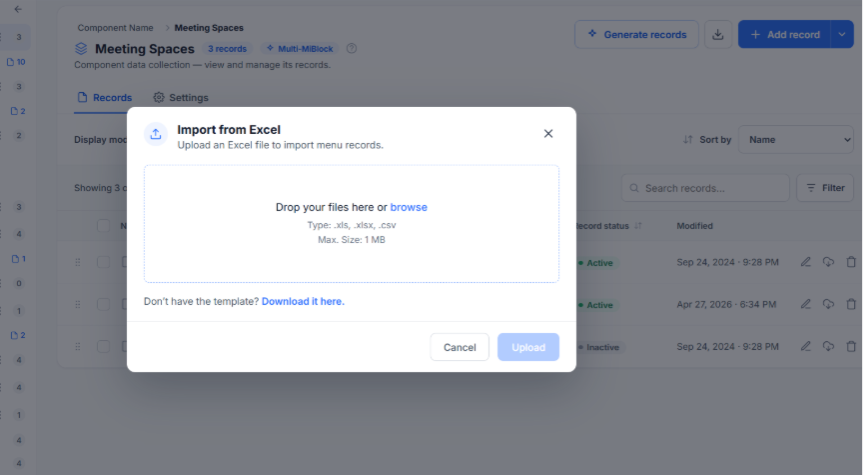
- Bulk import: create, update or delete records by setting an Action on each row. Rows marked NoAction or left blank are untouched, so removing a row never deletes a record.
- Start anywhere in the tree: import or export a whole component from the top level, or one record and its children from a lower level.
- Guided data entry: drop-downs for parent records, status and fixed-value fields help prevent typing errors. A blank template is available for new components.
- Validation before anything saves: the CMS checks every row first. Import the valid rows now and download an error report that marks failed cells in red with how to fix each one. Re-importing that report never duplicates rows that already passed.
- Email updates for large runs: big imports and exports run in the background and email the result when finished.
- Files can be .xls, .xlsx or .csv, up to 1 MB. JSON, array and relationship fields are still edited in the record editor.
Why It Matters: Coverage and completeness are signals AI engines reward, and accurate structured records feed the knowledge layer behind every page. Bulk updates let teams fill gaps and refresh facts across an entire component in one pass, then confirm exactly which rows landed.
What's next: from AI visibility to action
Knowing where you appear in AI answers is only half the job. Businesses then ask what to do about the gaps, and generic advice ignores the content they already have.
What's Next:
- AI Presence in Milestone Local expands from beta to a gradual rollout, starting with 25% of Local customers.
- AI Presence recommendations are in development and being validated so each one is actionable at launch.
- Context-rich GEO recommendations: GEO Intelligence now crawls each customer's live website. Recommendations will weigh what is already published before suggesting new content or optimizations. Completion is expected within the next one to two sprints.
Why It Matters: Recommendations grounded in a business's real content turn a visibility baseline into a prioritized plan.
The next phase of AI-powered discovery favors businesses that can see their gaps, fix them fast and keep their facts consistent everywhere AI looks. This release moves each of those forward.
Was this article helpful?
That’s Great!
Thank you for your feedback
Sorry! We couldn't be helpful
Thank you for your feedback
Feedback sent
We appreciate your effort and will try to fix the article